EMACS RCRLIB-MODE FOR EDITING CODE REPLACEMENT FILES

OVERVIEW
rcrlib is a library of functions and code replacement files for use in combination with the PhotoMechanics software. rcrlib stands for Recursive Code Rreplacement library.
rcrlib-mode is an editing mode for simplifying editing code replacements using the GNU Emacs text editor. One of the most valuable features fo Emacs when working with code replacement files is the possibility to record and replay sophisticated keystroke sequences which simplify reformatting any roster for any source in nearly no time. The editor is available on nearly all platforms, including MacOS, Windows, and of course Linux. You should familiarise yourself with the Emacs editor before using the rcrlib-mode. A good introduction can be found at GNU Emacs – A Guided Tour of Emacs. A cheat-sheet for the most common commands can be found at GNU Emacs Reference Card.
Current version
Current version: 1.0
Release: rev.5, 2026-03-28
LICENSE
Version 1.0 (which is by the way the most recent version as of today) of the rcrlib-mode is releases under the CC BY-NC-MD 4.0 license. This license enables re-users to copy and distribute the material in any medium or format in unadapted form only, for non-commercial purposes only, and only so long as attribution is given to the creator. CC BY-NC-ND includes the following elements:
- BY: credit must be given to the creator.
- NC: Only non-commercial uses of the work are permitted.
- ND: No derivatives or adaptations of the work are permitted.
To clarify, you are allowed to use the rcrlib-mode in your commercial work, for example as a freelance photographer. But you are not allowed to make money from the rcrlib-mode itself. You are also allowed to configure and adapt the rcrlib-mode for your personal use, but you are not allowed to provide these adaptions to any third-party. If you believe your adaptions are useful to third-parties, you may submit them to me for inclusion in an upcoming version of the rcrlib-mode. By submitting your work, you transfer the copyright of your adaptions to me (for practical purposes). In return I offer you a free license to any and all upcoming versions of the rcrlib-mode, even if I decide to charge a fee for future versions.
INSTALLATION
- Install Emacs on your local computer and configure it for your platform.
- Download the
rcrlib-modefrom rcrlib.cdsp.photo/download/rcrlib-mode.el and save it in the directory where you store your Emacs configuration files. - Edit the
rcrlib-mode.elfile by- Replace the sequence
CRCwith your code replacement prefix. As the code replacement character is used in regular expressions, it probably must be escaped, that is, prefixed with\\. Revert to the Emacs user’s guide for whether your code replacement character needs prefixing. - Replace the sequence
CRPwith a one-character prefix you want to use for extended code replacement codes generated byrcrlib-mode. I use the+sign. - Replace the sequence
CRAwith a one-character prefix you want to use for extended code replacement codes generated byrcrlib-mode. I use the-sign.
- Replace the sequence
- Optionally you may compile the mode file using the
byte-compile-filecommand. - Make sure that the
rcrlib-mode.elfile is in theload-pathof your Emacs installation. Alternative you may have to add the following command to your.emacsconfiguration file:(add-to-list 'load-path "your path to rcrlib-model.el"). - Autoload the
rcrlib-modeby adding the following command to your.emacsconfiguration file:(autoload 'rcrlib-mode "rcrlib-mode.el" "Recursive Core Replacement Library" t).
Now you are ready to go!
USE
To enable the rcrlib-mode, you need to enter the command M-x rcrlib-mode in each buffer you want to use it. It will then automatically fontify that buffer, as shown in Figure 1. Code replacement codes will be shown in blue, variables in green, recursive code replacements in pink, comments in red-ish, and tab characters will have a yellow background (if you have two consecutive tabs, they are shown in orange, rather than yellow, as this typically indicates a mis-formatted core replacement file).
If you want emacs to automatically switch to the rcrlib-mode, add the following code at the beginning of the first line of your core replacement file, as show in Figure 1: // -*- mode: rcrlib -*-
Note that the colouring of tab characters has been added in rev.5. Only Figures 1, 6, and 7 have been updated using the latest version.
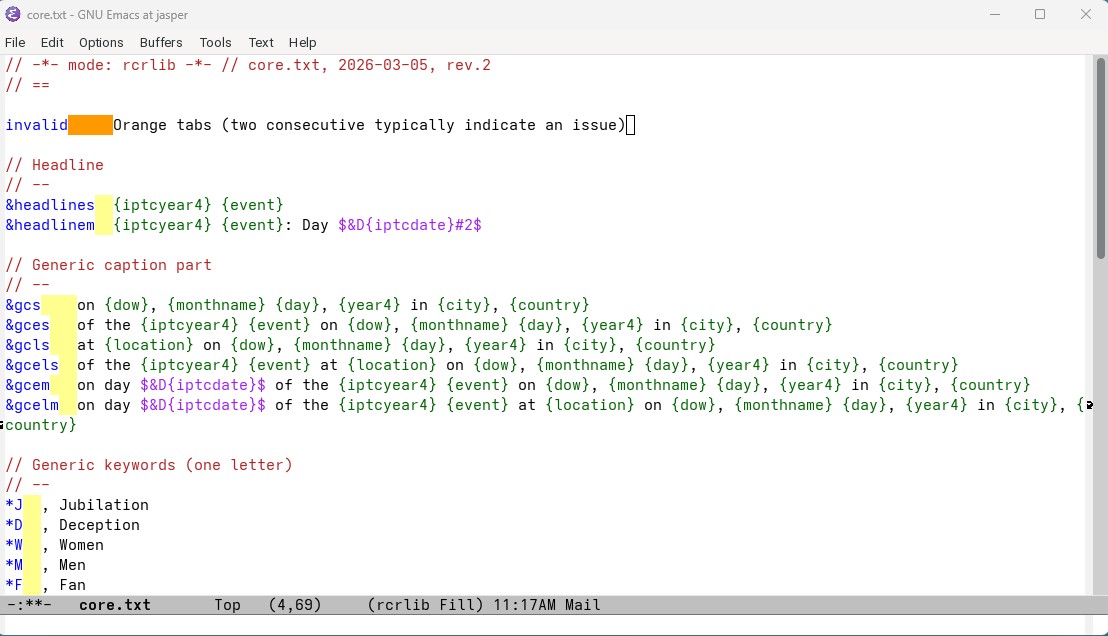
Figure 1. Screenshot from a sample code replacement file using the rcrlib-mode.
The rcrlib-mode comes with a number of codes as shown in Table 1. The commands can either be run using META+x followed by the command name or, for most commands, a defined key sequence prefixed by CTRL+r. They are applicable to a selected range of text. Note that the default CTRL+r has been reassigned to CTRL+r CTRL+r.
| Command | Keystroke | Description |
|---|---|---|
rcrlib-ascify |
CTRL+r CTRL+a | Replaces any accented character by their non-accented equivalent. Example: Désirée → Desire, Müller → Mueller. |
rcrlib-append-asciified-name |
For each code replacement row, the non-accented version of the replacing code is appended as a second column, so that it can be referenced by appending #2 to the replacement code.Example: cr01 [TAB] Désirée Müller → cr01 [TAB] Désirée Müller [TAB] Desiree Mueller. The non-accented version is accessed by =cr01#2= |
|
rcrlib-switch-last-first-name |
CTRL+r CTRL+t | As the command name says it, switches last and first names and all names, except prefixes, are capitalised. Prefixed last names should be handled correctly and multiple first names are supported (unless there is a bug in the function). Example: DIDERICH Claude → Claude Diderich, di Mercur Paulo Sergio → Paulo Sergio di Mercur. |
rcrlib-normalise-numbering |
CTRL+r CTRL+n | Reformats the first number in each code replacement code so that it has at least a length of 2, optionally preceding it by a 0. Example: ch2 → ch02 and de23 remains de23. |
rcrlib-numberise |
Adds the number from the replaced code to the replacing code. Example: ch01 [TAB] Reto Müller → ch01 [TAB] Reto Müller #01 |
|
rcrlib-numberised-codes |
CTRL+r CTRL+c | Adds one or two versions of each code extending them by adding the jersey number and team name. Example: ch01 [TAB] Reto Müller → ch01 [TAB] Reto Müller [RET] +ch01 [TAB] Reto Müller #01 of team Switzerland [RET] -ch01 [TAB] Reto Müller #1 |
Removing accents
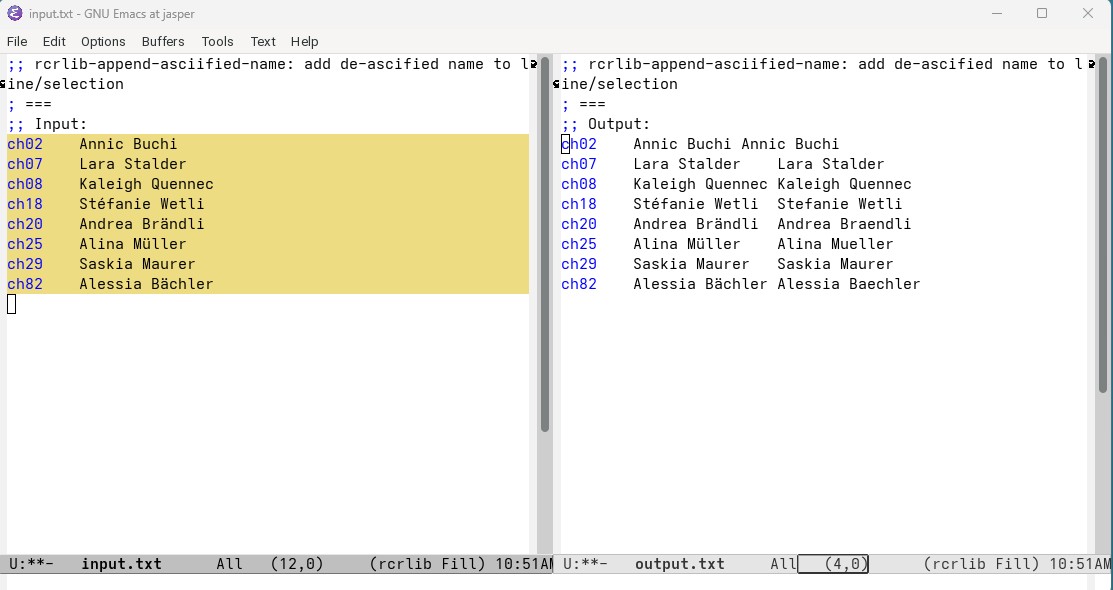
European names often use accents, like in Jérome or Müller. Some photo databases and/or customers only support 7bit ASCII character captions. The command rcrlib-asciify removes all accented characters in a selection region and replaced them with their non-accented version. German Umlaute are replaced with their respective multi-character equivalents. Figure 2 illustrates the use of the rcrlib-asciify command.
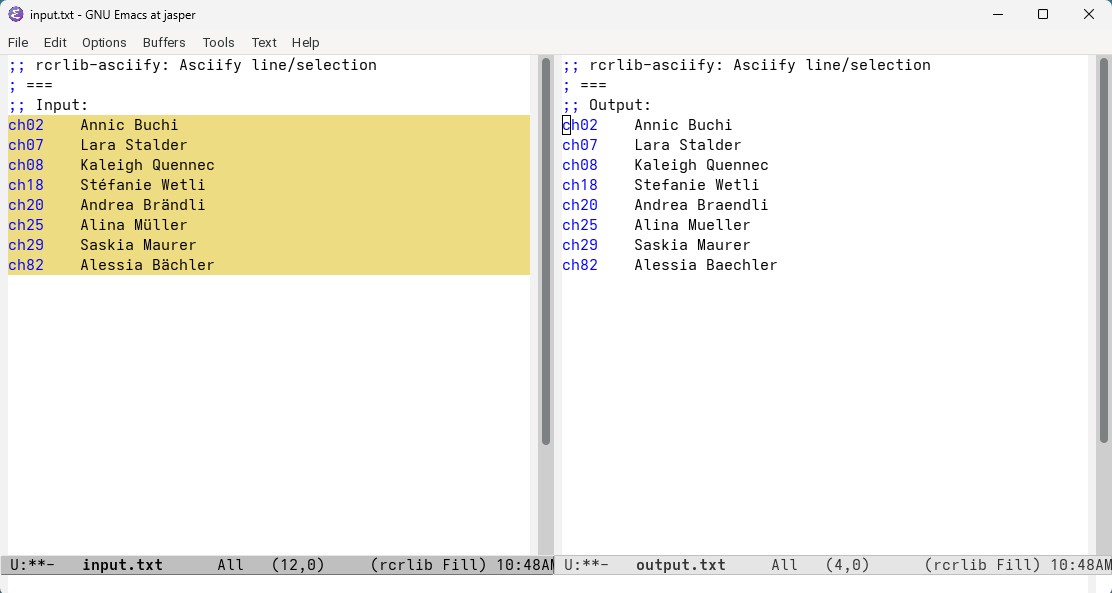
Alternatively, the command rcrlib-append-asciified-name adds a second column to the code replacement codes that contains the replacing code without accents. This allows to reference the accented and non-accented version of a replacement code from the same file. The non-accented version is accessed by appending a #2 to the replacement code. Figure 2 illustrates the use of the rcrlib-asciify command. For example =ch20= resolves into Andrea Brändlie, while =ch20#2= resolves into the non-accented version Andrea Braendli (= being the code replacement separator code).
Switch first and last name
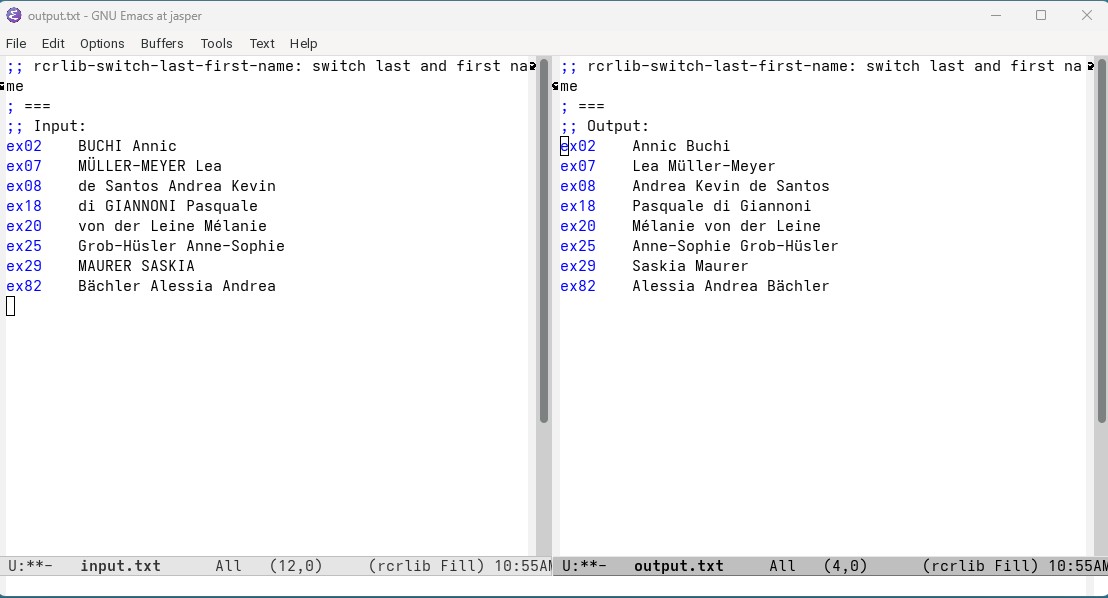
Rosters from third-party sources often use the format “last-name first-name”. The function rcrlib-switch-last-first-nameswitches last and first names and capitalises each name, except for nobility prefixes, like “von” or “di”. The function recognises multiple first names as well as names that include dashes correctly (unless the function contains a bug). Figure 4 illustrates how multiple possible cases are handled.
Normalise numbering
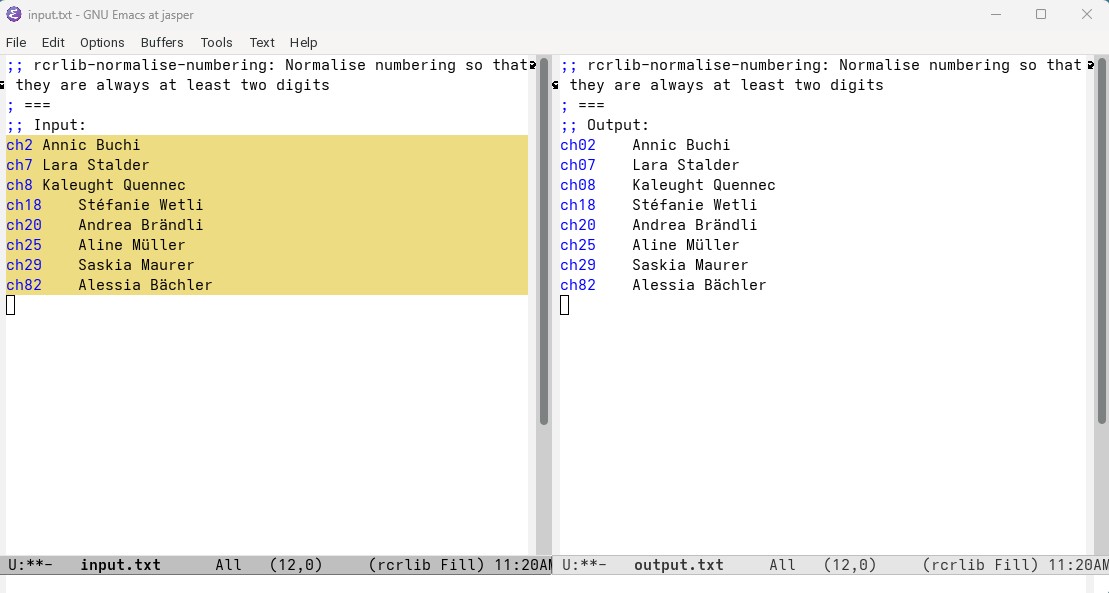
Sometimes rosters include single digit and multiple digit numeric. While this may be efficient, it leads to the problem that when, for example, editing the incorrect replacement code =ch42= which should be ch41 by starting to delete the 2, the code becomes =ch4= which may be a valid replacement code (but not the one sought-after). If any replacement code contains two digits, this will not happen. The function rcrlib-normalise-numbering prefixes any number that has less that the specified length with zeros. Figure 5 illustrates how the function works, given a length of 2.
Generate extended code replacement codes
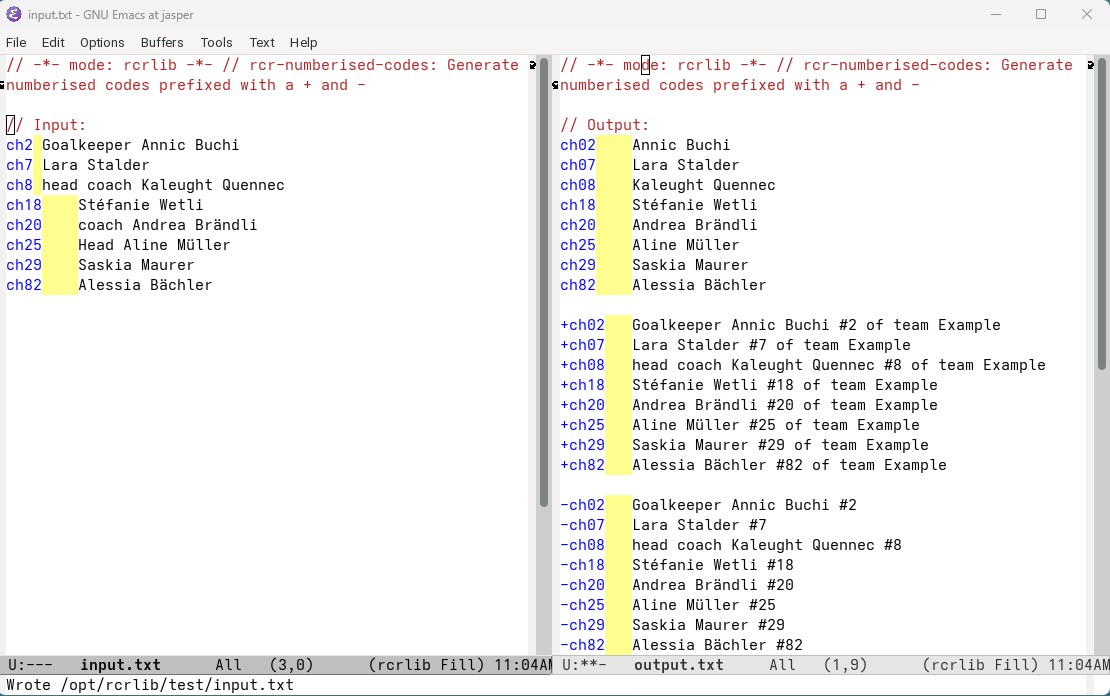
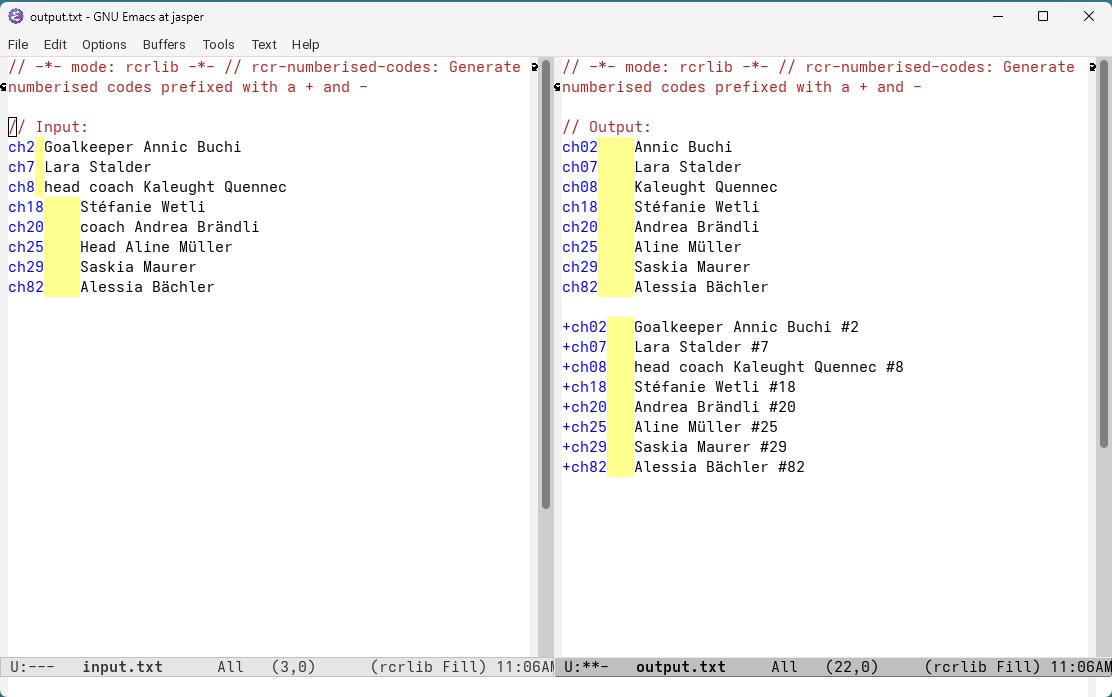
The last function called rclib-numberised-codes generates additional useful codes including jersey numbers and optionally team affiliations. When executing the function, Emacs asks for the team affiliation identification. This may be for example of team Switzerland, of the Boston Celtics, or (GER). The function generates for each code replacement line an new one prefixing the replacement code with a + (or whatever you have configured CRP to be) and adding #no where no is the number included in the replacement code followed by the team affiliation. In addition, a replacement code prefixed by a - (or whatever you have configure CRA to be) and adding the jersey number as #no. In no team affiliation is entered, only the +-prefixed replacement codes are generated (but without a team affiliation). Figures 6 and 7 illustrate how the function works. These replacement codes may be used as follows in the caption field =-ex02= and =+ex29= fight for the puck ... to expanding into Annic Buchi #02 and #Saskia Maurer #29 of team Example fight for the puck .... The code =ex02=, =ex29= can be entered in the people field.
In addition, in the code replacements not prefixed by + or -, the words in the list rcrlib-words-to-remove are removed. This allows, for example, the prefix goalkeeper or head coach to be removed from the replaced text (which is not relevant in the people field). If you do not want any words to be removed, simply empty the list rcrlib-words-to-remove.